

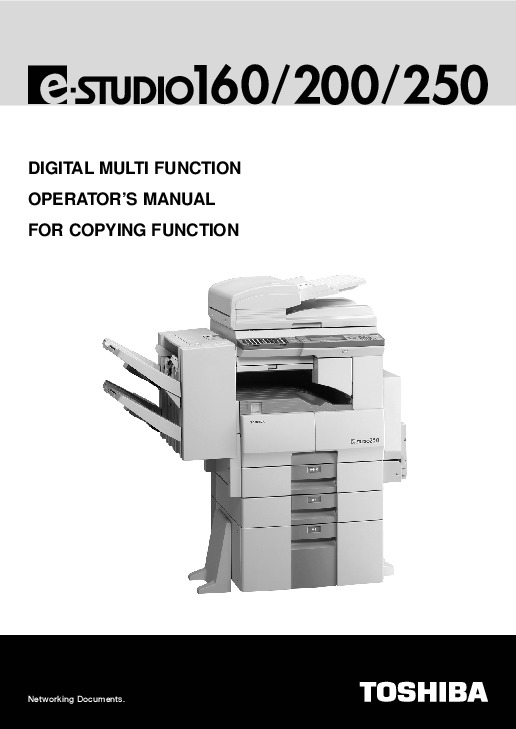
 Toshiba E-Studio 160 200 250 Printer Copier Owners Manual - Enlarge page 1 of 180
 2 of 180
 3 of 180
 4 of 180
 5 of 180
 6 of 180
 7 of 180
 8 of 180
 9 of 180
 10 of 180
 11 of 180
 12 of 180
 13 of 180
 14 of 180
 15 of 180
 16 of 180
 17 of 180
 18 of 180
 19 of 180
 20 of 180
 21 of 180
 22 of 180
 23 of 180
 24 of 180
 25 of 180
 26 of 180
 27 of 180
 28 of 180
 29 of 180
 30 of 180
 31 of 180
 32 of 180
 33 of 180
 34 of 180
 35 of 180
 36 of 180
 37 of 180
 38 of 180
 39 of 180
 40 of 180
 41 of 180
 42 of 180
 43 of 180
 44 of 180
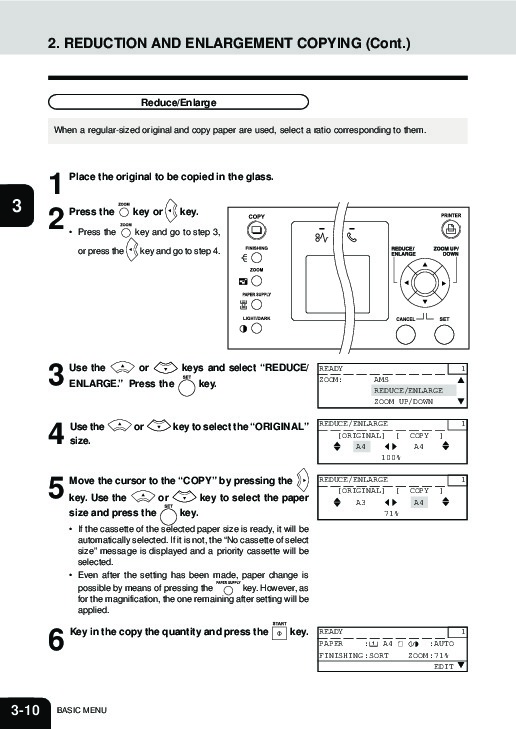 45 of 180
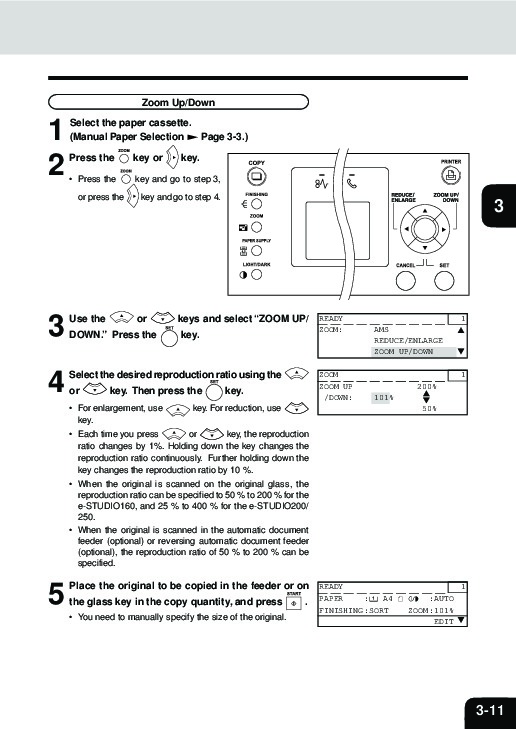 46 of 180
 47 of 180
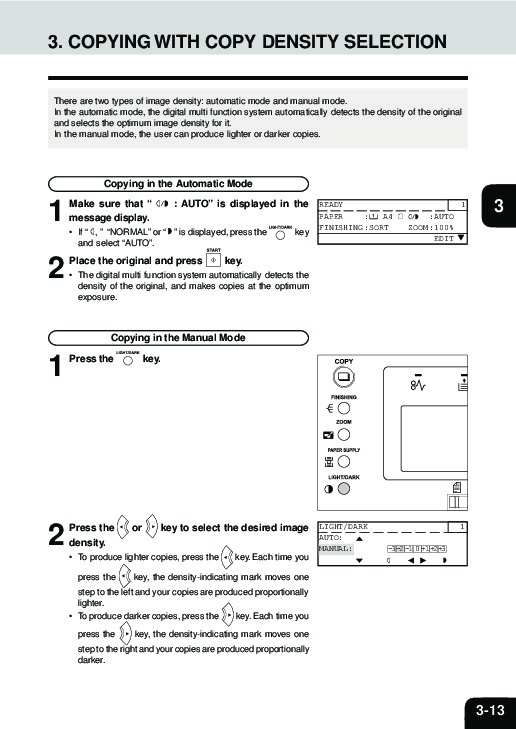 48 of 180
 49 of 180
 50 of 180
From inside (document excerpt):
DIGITAL MULTI FUNCTION OPERATOR’S MANUAL FOR COPYING FUNCTION Networking Documents. WARNING: Changes or modification made to this equipment, not expressly approved by TOSHIBA TEC or parties authorized by TOSHIBA TEC could void the user’s authority to operate the equipment. EPA ENERGY STAR ® (MFD) The United States Environment Protection Agency (EPA) has introduced a voluntary ENERGY STAR Program to encourage the widespread and voluntary use of energy-efficient technologies that enhance the workplace, improve product performance and prevent pollution.
User Manual Free Download. Operator’s Printer Manual Guide. Free Printer/Copier Manual Download PDF.
As an ENERGY STAR Partner, the TOSHIBA TEC CORPORATION has determined that this copier model meets the ENERGY STAR guidelines for energy efficiency. For Copier+Printer or FAX models, ENERGY STAR guidelines require ENERGY STAR Multifunction copiers to have a `Sleep Mode’ feature that automatically makes the copier enter the sleep mode after a period of inactivity. The copier must also automatically change to a `Low Power Mode’ (Automatic Energy Save) after a period of time since the last usage. Specifically, this copier complies with the following requirements: e-STUDIO160/200/250 Copier + Printer model (Base model) `Sleep Mode (Super Energy Saver Mode)’The copier consumes less than 5 watts in the `Sleep Mode (Super Energy Saver Mode)’. `Sleep Mode (Super Energy Saver Mode)’ Default TimeThe default time for the `Sleep Mode (Super Energy Saver Mode)’ is 25 minutes (e-STUDIO160)/ 60 minutes (e-STUDIO200/250). `Low Power Mode’The copier consumes less than 111.6 watts (e-STUDIO160)/127.0 watts (e-STUDIO200)/146.25 watts (e-STUDIO250) during Energy Save. `Low Power Mode’ Default TimeThe default time for the `Low Power Mode’ is 15 minutes. e-STUDIO160/200/250 Copier + Printer or FAX models (Multifunction model) `Sleep Mode (Super Energy Saver Mode)’The copier consumes less than 70 watts (e-STUDIO160/200)/80 watts (e-STUDIO250) in the `Sleep Mode (Super Energy Saver Mode)’. `Sleep Mode (Super Energy Saver Mode)’ Default TimeThe default time for the `Sleep Mode (Super Energy Saver Mode)’ is 25 minutes (e-STUDIO160)/ 60minutes (e-STUDIO200/250). `Low Power Mode’The copier consumes less than 111.6 watts (e-STUDIO160)/127.0 watts (e-STUDIO200)/146.25 watts (e-STUDIO250) during Energy Save. `Low Power Mode’ Default TimeThe default time for the `Low Power Mode’ is 15 minutes. Note 1- The default setting for the `Sleep Mode (Super Energy Saver Mode)’ and `Low Power Mode’ can be changed. If you want to increase the default setting, contact your authorized Toshiba dealer. Note 2- For Copier model (Base model), to restart the copier after an automatic shut-off, press the SUPER ENERGY SAVER key. Note 3- For Copier model (Base model), after an automatic shut-off, the weekly timer feature cannot be activated. If you prefer to activate this feature, contact your authorized Toshiba dealer. When an option of the FAX function is installed, for energy saving purpose, we recommend setting the weekly timer. In accordance with the EPA ENERGY STAR Program guidelines, this copier is suitable for the use of recycled copier paper (with up to 100% post consumer content) meeting the requirements as specified in ENV 12281 (paper-printing and business paper-Requirements for copy paper for dry toner imaging processes). I
Wikipedia’s page for Toshiba
Publisher: www.toshiba.com